Save this guide and work through it step by step
Start with the quick-start section, complete the checklist or worksheet, then write down one decision and the next action.
Free practical resource
Get the complete resource by email
Enter your email to receive Agency AI tool evaluation checklist and a short practical follow-up sequence.
No spam. Unsubscribe in one click.
The UK Agency’s Guide to AI SEO & GEO Automation
For UK SEO agencies, scaling content production and adapting to Generative Engine Optimisation (GEO) is no longer optional. However, the market is flooded with generic AI wrappers that add friction, slow down delivery, and produce low-value content. Switching between too many disconnected tools creates operational friction and slows down client delivery. This evaluation checklist is designed specifically for SEO managers selecting tools for client delivery. It helps you bypass the hype, protect your clients’ search visibility, and integrate AI seamlessly into your existing workflows without wasting budget.
10-Minute Quick Start: Audit Your Current Workflow
Before signing up for another software trial, spend 10 to 15 minutes mapping your current delivery bottlenecks to ensure you choose a tool that actually saves time rather than adding complexity.
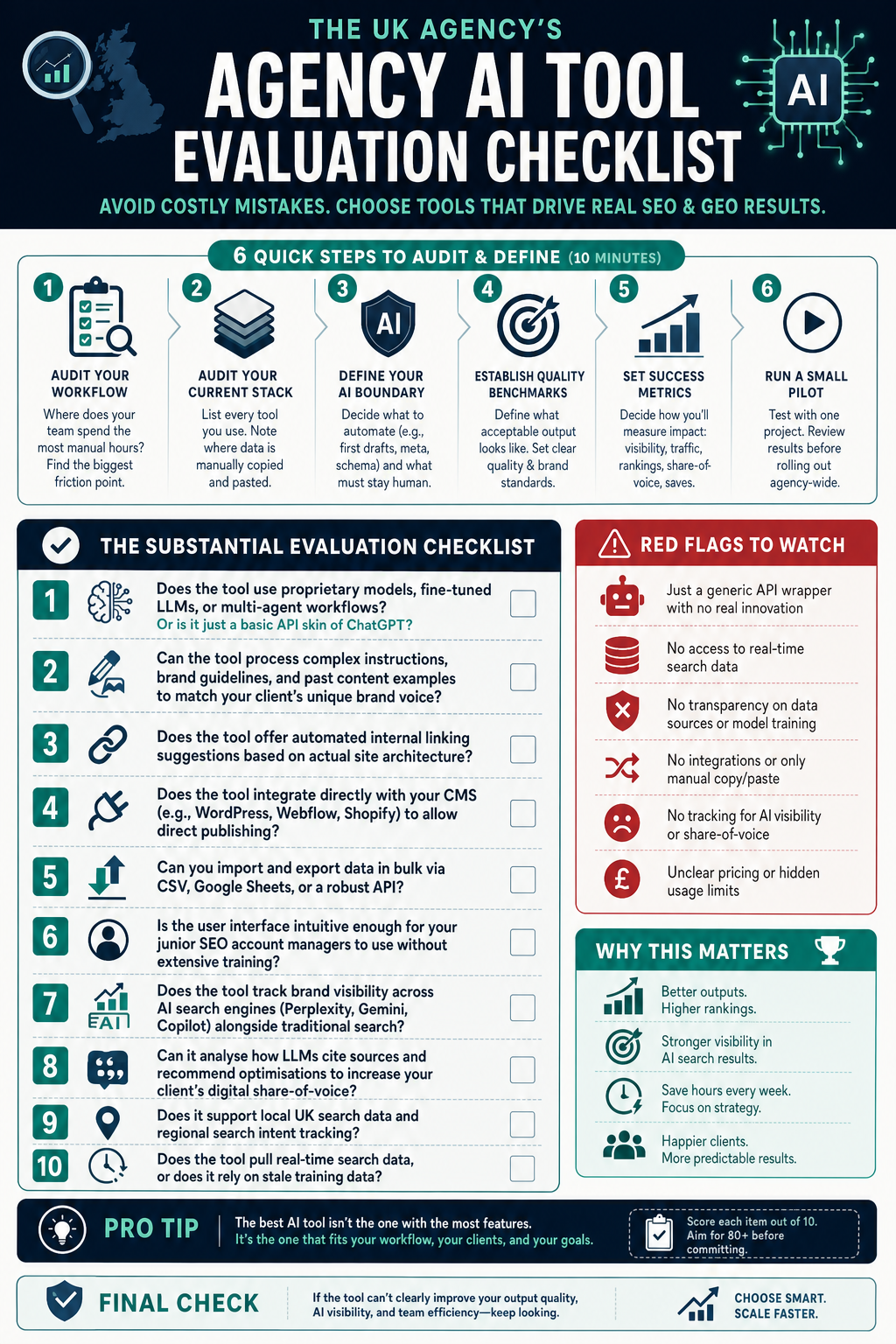
- Identify the Friction Point: Where does your team spend the most manual hours? Is it keyword research, brief creation, content writing, or GEO tracking?
- Audit Your Current Stack: List every tool your team currently uses. Note where data must be manually copied and pasted. If a tool does not integrate with your existing workflow, it will likely go unused.
- Define Your AI Boundary: Decide what you will automate (e.g., first drafts, meta descriptions, schema markup) and what must remain human-only (e.g., final editorial review, local brand tone alignment).
- Establish Quality Benchmarks: Define what acceptable output looks like. AI outputs can sometimes be too generic, so you must establish clear editorial standards before scaling production.
Decision Framework: Comparing AI SEO & GEO Approaches
To make a confident decision, you must understand the trade-offs between different types of AI SEO software. Use this comparison table to identify the best fit for your agency’s specific needs.
| Evaluation Criteria | Standard AI Wrappers | Specialist AI SEO Platforms | Guided / Custom Automation |
|---|---|---|---|
| Best For | Quick, low-cost ad-hoc tasks and basic copywriting. | Scalable content production, keyword research, and GEO tracking. | Enterprise clients and highly bespoke agency workflows. |
| Workflow Integration | Poor. Requires constant manual copying and pasting. | Moderate to High. Often includes APIs, CMS integrations, and bulk export. | Very High. Built directly into your existing agency systems. |
| GEO & Traditional Coverage | None. No live search data or AI engine visibility tracking. | Strong. Tracks traditional SERPs alongside AI search engines. | Customisable based on your specific API integrations. |
| Data Quality & Accuracy | Low. Relies on static LLM training data. | High. Pulls real-time search data and live SERP insights. | High. Uses verified external data sources. |
| Agency-Friendly Pricing | Pay-per-seat, which can become expensive as your team grows. | Tiered plans with multi-seat licensing and white-label options. | High upfront development cost, low ongoing running costs. |
Substantial Evaluation Checklist & Worksheet
Use this worksheet to evaluate any prospective AI SEO or GEO tool. Rate each tool from 1 to 5 on the following criteria to calculate its suitability for your agency.
Pillar 1: Real AI vs. Simple Wrapper
- Does the tool use proprietary models, fine-tuned LLMs, or multi-agent workflows? Or is it just a basic API skin of ChatGPT?
- Can the tool process complex instructions, brand guidelines, and past content examples to match your client’s unique brand voice?
- Does the tool offer automated internal linking suggestions based on actual site architecture?
Pillar 2: Workflow Integration & Usability
- Does the tool integrate directly with your CMS (e.g., WordPress, Webflow, Shopify) to allow direct publishing?
- Can you import and export data in bulk via CSV, Google Sheets, or a robust API?
- Is the user interface intuitive enough for your junior SEO account managers to use without extensive training?
Pillar 3: GEO and Traditional SEO Coverage
- Does the tool track brand visibility across AI search engines (such as Perplexity, Gemini, and Copilot) alongside traditional Google SERPs?
- Can it analyse how LLMs cite sources and recommend optimisations to increase your client’s digital share-of-voice?
- Does it support local UK search data and regional search intent tracking?
Pillar 4: Data Quality and Accuracy
- Does the tool pull real-time search data, or does it rely on stale training data?
- Can it accurately analyse search intent and group keywords into logical topical clusters?
- Does it provide transparent sources for its recommendations, allowing your team to verify the data?
Pillar 5: Agency-Friendly Pricing & Scalability
- Does the tool offer white-label reporting that you can send directly to clients?
- Are there clear limits on API credits, word counts, and keyword tracking, or will you face unexpected overage charges?
- Does the pricing model support agency scaling without eating into your margins?
Worked Example: Evaluating a Tool in Practice
Let’s look at how a mid-sized SEO agency based in Bristol evaluated an AI SEO tool for a local commercial client. The agency needed to produce 20 high-quality landing pages targeting local search intent across the South West of England.
«Our manual brief creation and local keyword mapping took 15 hours per week. We needed a solution that would speed up our processes without sacrificing the editorial quality our clients expect.»
The agency tested a specialist AI SEO platform against their existing manual workflow. They verified that the tool could pull real-time UK search data and generate structured briefs that matched the client’s brand guidelines. By using a tool with built-in GEO tracking, they also monitored how often the client’s brand was cited in AI-generated search summaries, securing a 25% increase in digital share-of-voice within three months while reducing brief creation time from 45 minutes to 5 minutes per page.
Red Flags to Watch Out For
Avoid wasting your agency’s budget by watching out for these common warning signs during software trials:
- No Real-Time Data: The tool cannot fetch live SERP results, leading to outdated keyword recommendations and inaccurate content optimization.
- Lack of API or Export Options: You are forced to manually copy and paste text, which creates friction and slows down delivery.
- Generic Outputs: The generated content lacks editorial nuance, depth, or local UK context (e.g., using US spelling or generic business examples).
- No GEO Tracking: The tool ignores how LLMs and AI search engines cite sources, leaving you blind to modern search trends.
- Hidden Costs: The pricing model charges heavily per user seat or has low credit limits that make scaling client delivery unprofitable.
Final Action Checklist
Take these immediate steps to make a confident decision about your agency’s AI SEO toolset:
- Run a 15-minute workflow audit to find your biggest operational bottleneck.
- Filter out simple GPT wrappers that do not offer API access or real-time data.
- Use the comparison table to select the right approach for your agency’s size and client mix.
- Test your shortlisted tools using a single client campaign before rolling them out agency-wide.
- Verify that the tool supports UK-specific search data and local search intent.
- Establish clear editorial guidelines for your team to review and refine all AI-generated outputs.
Related articles
- Agency AI workflow scorecard for margin, speed, and quality
- A UK-Focused Guide to Integrating AI Tools into an SEO Agency Workflow
Sources
- 7 AI SEO tools built for agencies (tested on clients)
- How to Choose an AI SEO Agency: The 5-Question …